
A distributor asks to see the stock screen. Its sales reps take rush orders just before the shipping cutoff, but some of the stock on screen is already reserved for someone else. In the last example the buyer shared, the customer waited and accepted a split shipment. The distributor kept the order. Use this same fictional deal through all four stages. The amounts, thresholds, and dialogue are illustrative.
After each meeting, send the buyer a short record of what their team confirmed, what evidence is still missing, and who owns the next decision. Copy the deal sheet at the end for each opportunity.
1. Discover the workflow before the demo · SPIN Selling
Lead · ERP sales lead. Buyer participants · Sales lead, warehouse manager, and IT lead. Identify the owner of the order-confirmation process and who can approve changes.
| Ask about | A question you can use |
|---|---|
| Situation | “Can you walk me through the last rush order from the customer’s call to the point when sales confirmed how many units it could ship?” |
| Problem | “When does your team have to call the warehouse even though the stock quantity is already on screen?” |
| Implication | “While sales waited for the warehouse to reply, what happened to the customer’s order and the shipping plan?” |
| Need-payoff | “If sales could see reserved stock and stock available to sell separately, when could reps confirm an order themselves? When would they still need warehouse approval?” |
Ask what reservation details sales needs to see and who can approve reassigning stock. If the business case needs a cost estimate, agree with the buyer on a representative period, how to count incidents, and when waiting time starts and ends.
Move to the demo when the buyer confirms the workflow and can say what each test must show. Supaket episode 1
2. Let the buyer verify the demo · Influence
Lead · ERP specialist who configured the reservation rules and can trace the data. Buyer reviewers · Sales checks what a rep can promise, warehouse checks the quantities and approval rules, and IT checks the data source, timing, and permissions.
| Run this test | Evidence to capture |
|---|---|
| A rush order has enough stock available to sell | Compare starting stock and reservations with the quantity shown in a sales account. Have sales say how many units it would promise. |
| Stock is on hand but already reserved | Save a reservation in a warehouse account. Check when the sales quantity changes, that reserved units are excluded, and which reservation details sales can see. |
| Sales asks to reassign reserved stock | Have a rep try the change, then have the warehouse manager approve it. Check that sales cannot bypass approval and that the history shows who changed what and when. |
Try saying “Can your warehouse lead save the reservation while a rep opens their own sales account? Let’s compare the timestamp on the source record with when the rep sees the new quantity.”
Move to the decision discussion when the buyer has reviewed the evidence and agreed what still needs testing, who will run it, and when. If a required demo test fails, record the gap and agree how to retest. Supaket episode 2
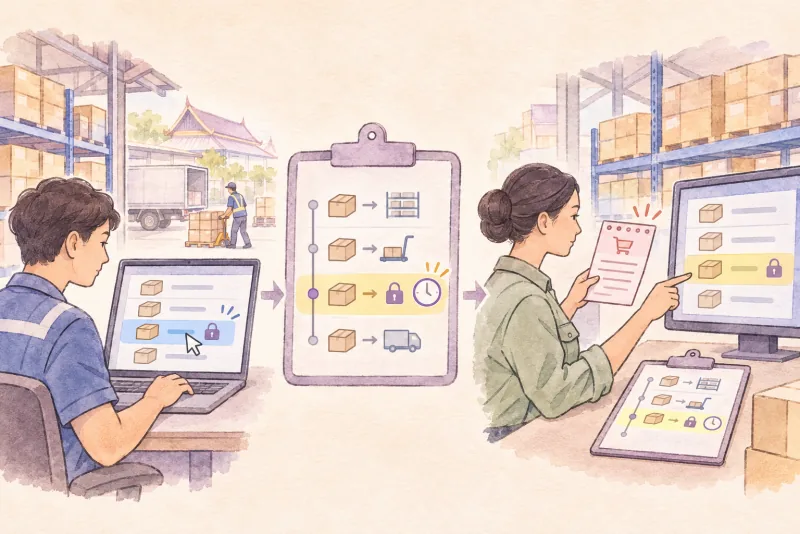
3. Help the buyer decide whether to proceed · The JOLT Effect
Lead · ERP sales lead and specialist. Buyer roles · Sales, warehouse, and IT agree the checks. The operations director can authorize a live-order pilot. Name the operations lead who can pause it.
| Move | Apply it to the same distributor |
|---|---|
| Judge the indecision | Ask whether the team wants to change, which evidence it still needs, and whose approval is pending. Log the late-update question and live-pilot approval separately. |
| Offer your recommendation | Rehearse at Warehouse A outside production using authorized sample orders and the relevant integration. Simulate a late reservation update near cutoff. |
| Limit the exploration | Agree on the next question the buyer needs answered. Can reps spot an outdated quantity, hold affected confirmations, and resume after the warehouse checks the updated figures? Include evidence required by IT or procurement. |
| Take risk off the table | Practice the pause and recovery steps. Sales communicates the hold. If the feed is late beyond the agreed limit or stock figures cannot be reconciled, the named operations lead pauses the pilot. Warehouse and IT reconcile affected orders and reservations before operations authorizes a return to the previous workflow. |
Try saying “If the rehearsal shows what reps see when the feed is late and when they can safely resume, what else would your operations director need to decide on a live pilot? Would you like to schedule the rehearsal?”
Move to a scoped proposal when the buyer has reviewed the rehearsal and wants to discuss delivery. In this case Warehouse A passes the pre-sale rehearsal. A live pilot still requires approval. Supaket episode 3

4. Negotiate scope and close on verifiable terms · Getting to Yes
Lead · ERP sales lead and delivery lead. Buyer roles · Operations confirms the cross-warehouse workflow, IT validates the estimate inputs, procurement checks comparable scope and terms, finance confirms budget, and the designated signatories approve the agreement.
The buyer wants all three warehouses for THB 600,000. Ask what the request protects. Here, rush orders cross warehouse boundaries and finance has approved THB 600,000 for this budget cycle. The vendor still needs to see B and C’s file formats, item codes, and reservation feeds before committing to their delivery schedule.
Try saying “If we start with Warehouse A at THB 600,000, can reps keep calling B and C to confirm availability? If that won’t work for rush orders, let’s look at both sites’ sample files together so we can price the additional work.”
| Option | Scope and evidence |
|---|---|
| Warehouse A for THB 600,000 | Make it clear to reps that B and C still use phone confirmation. Price and schedule the expansion after reviewing approved samples from both sites. |
| Three warehouses, working estimate of THB 900,000 | Stagger go-live by data readiness. The estimate adds 200 hours × THB 1,500 = THB 300,000 for matching item codes, adapting integration, and retesting B and C. Recalculate using sample files, integration test results, agreed rates, and reusable work. Additional budget approval is required. |
If there is no deal, compare each side’s best realistic alternative (BATNA). The buyer could keep phone checks for another budget cycle while collecting sample data if it can staff those checks. The vendor could assign its team to another confirmed project if scheduling allows. Compare the cost, time, and effect on rush orders.
Example Warehouse A payments
All amounts are service fees before tax.
| Milestone | Amount | Evidence and sign-off |
|---|---|---|
| Start of work, 30% | THB 180,000 | Sign the Warehouse A scope and name the data preparation and acceptance owners. |
| Rehearsal passes, 40% | THB 240,000 | Warehouse manager and IT sign off on the test-environment rehearsal using the Warehouse A setup delivered after kickoff. |
| Final acceptance, 30% | THB 180,000 | Operations director approves the live-pilot results and signs off on Warehouse A under the contract’s acceptance terms. |
An example acceptance test uses a five-minute threshold agreed by sales, warehouse, and IT for this scenario. When an update is more than five minutes late, the system warns the rep and sales pauses affected confirmations. After the update arrives, warehouse staff check that reserved and available-to-sell quantities match expected results before sales resumes. The earlier pre-sale rehearsal informs this test. The paid rehearsal is run on the implementation delivered under the agreement.
Close the sale when both sides have signed the agreed scope and terms. Schedule kickoff with the named owners and carry the open live-pilot approval into delivery. Supaket episode 4

Deal sheet · Copy for each opportunity
Customer / opportunity ____________________
Date / seller owner / buyer process owner ____________________
Buyer budget approver / authorized contract signer ____________________

[ ] Discovery agreed
Most recent order / observed impact / evidence ____________________
Outcome buyer wants / exception requiring approval ____________________
Demo scenarios / expected results / agreed data ____________________

[ ] Demo reviewed
Scenario / expected vs. observed / reviewer / evidence link ____________________
Setup tested / what still needs verification ____________________

[ ] Buyer decision recorded
Decision requested / approver / decision and date ____________________
Rehearsal or pilot scope / pass criteria / evidence ____________________
Pause trigger / who calls it / reconciliation and restart owner ____________________

[ ] Commercial decision recorded
Chosen scope / exclusions / price before tax / fallback if no deal ____________________
Milestones / amounts / acceptance evidence / signatories ____________________
Fix or change process / contract reference / delivery handoff owner ____________________

Next action / owner / due date ____________________
Open issue / evidence or approval needed / owner / due date ____________________
Agreed follow-up contact and date ____________________