
“Can we see the inventory screen next time?” You could prepare a demo of item lookup, warehouse transfers, and stock counts and still miss what the buyer is trying to find out. Can a sales rep confirm a rush order when the quantity on screen includes stock already reserved for someone else?
I’d use Neil Rackham’s SPIN Selling to prepare for that conversation. The four kinds of questions help sellers learn how work gets done, where it breaks down, what happens as a result, and what the buyer would gain by fixing it. Huthwaite describes SPIN as a framework for the conversation. In practice, you can move between question types as you hear how the buyer works. Book from McGraw Hill · Huthwaite’s SPIN framework
Prepare four kinds of questions around the buyer’s work
| Question type | What to ask about | Example question |
|---|---|---|
| Situation | How the work relevant to the purchase gets done today | “Can you walk me through a rush order, from the customer’s call to the point when sales confirms how many units they can ship?” |
| Problem | Where work stalls or people need a workaround | “When do you still have to call the warehouse before replying to the customer, even with the quantity on screen?” |
| Implication | What that changes for people, work, or decisions | “Last time you had to wait for the warehouse, what did that hold up for the customer and the shipping team?” |
| Need-payoff | What the buyer wants to be able to do if the problem is solved | “If the system showed reserved stock separately from stock available to sell, what would change when you take an order? When would you still want someone to check?” |
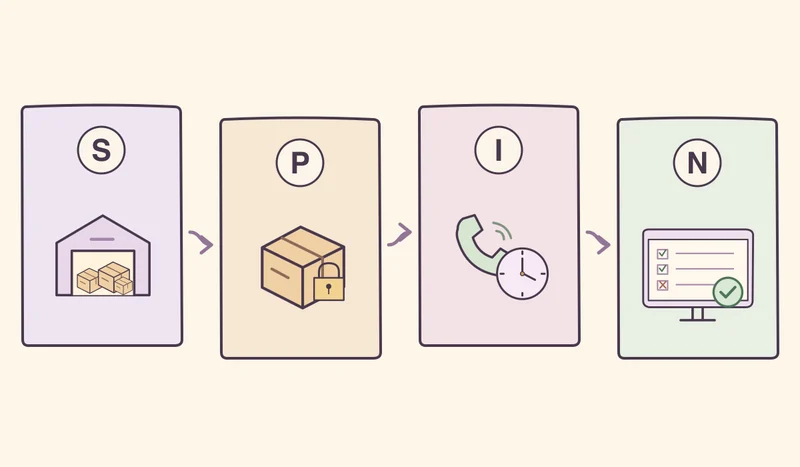
Save Situation questions for things you couldn’t learn from the documents or a previous call. If the buyer has already described the problem, ask about the most recent time it happened. An answer about the consequences may send you back to check whether sales and the warehouse mean the same thing by “available to sell.”
Let the buyer’s answer guide your next question
In this hypothetical conversation, an ERP seller is talking to the head of sales at a B2B distributor.
Seller “Could we walk through a rush order? What does your team check before confirming how many units it can ship?”
Buyer “We check the quantity on screen. If it’s low, we call the warehouse because some of that stock may already be reserved.”
Seller “What did the warehouse tell you the last time you called? What did your team do next?”
Buyer “The warehouse said the items were there but already reserved. We offered to split the shipment. The customer had to wait for an answer, and they ended up taking the split shipment. We kept the order.”
Seller “So the team had to wait before replying and then offer a split shipment. Does that only happen when stock is low, or are there other cases?”
Buyer “Mostly on rush orders near the shipping cutoff. I’d ask the warehouse manager to pull a few more examples.”
Seller “If the screen showed reserved stock and stock available to sell separately, what would your reps need to see to confirm the order themselves? When would you still want the warehouse manager to approve it?”
Buyer “We’d want to see who the stock was reserved for. If someone wants to move reserved stock to another order, the warehouse manager has to approve it and be able to see who changed what.”
“Are you losing a lot of sales because of this?” asks the buyer to confirm a loss you haven’t established. Here, the buyer kept the order. You can follow up on how long the team waited and what it took to change the shipping plan. If you need a business case, ask the buyer to choose a representative period, count the incidents, and agree on when the wait starts and ends before putting a monetary value on it.
Agree on what to test and who needs to be there
Invite the warehouse manager to define stock available to sell and when approval is required. Ask sales to confirm that the screen shows enough information to answer a customer. Have IT check where the reservation data comes from and when it updates. If the change crosses teams, ask who owns the process and who can approve a change to it. Use sample data or buyer-approved data with sensitive details removed.
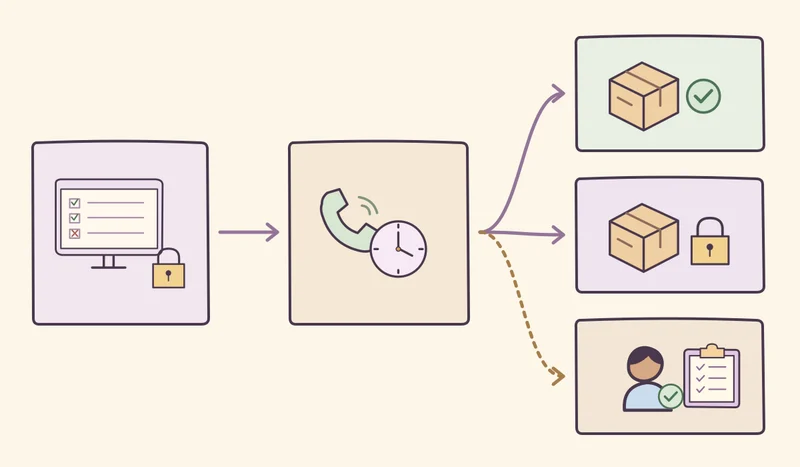
I’d propose testing three cases together. One order has enough stock available to sell. Another has stock on hand that’s already reserved. The third needs approval to reassign reserved stock to another order. Agree on the quantities the screen should show in each case, who can change a reservation, and where to see the approval history. If it’s still unclear whether the reservation data updates in time, make that a follow-up item after the demo.
What to check before you book the demo
Work the buyer wants to see / most recent example
Current process confirmed so far / open questions
Problem and impact the buyer described / evidence to request
Outcome the buyer wants / exceptions and approver
Required attendees / process owner / decision-maker
Test cases / expected outcomes / approved data source
Open issues / follow-up owner / date
This series starts with SPIN Selling to understand the work before the demo. In Influence, I’ll look at how to earn trust with evidence the buyer can check. The JOLT Effect will explore why a buyer might still hesitate after agreeing there’s a problem. Getting to Yes will take us into the negotiation over scope, price, and delivery terms using interests and criteria both sides can work with.