
The connector shows a timeout, so the operator resubmits the request. Later, the finance team finds two invoices for one shipment. This hypothetical incident continues from episode 5 of Building Teams. Here, we’ll go from deciding when to hold a review to defining what evidence closes a corrective action. Building Teams, episode 5
A blameless postmortem documents and reviews an incident in light of the information and conditions people had when they made decisions. Understanding why a choice seemed reasonable helps the team improve the interface, procedure, or checks for the next person. Each corrective action still needs an owner, a due date, and evidence others can verify. Google SRE’s chapter on postmortem culture
Agree on triggers before an incident
Google SRE gives examples of when to run a postmortem, including user impact beyond a threshold, data loss, manual intervention, missed detection, or a recovery that takes longer than agreed. Stakeholders can also request a review. For an ERP team, I’d start with incidents affecting data integrity, such as duplicate documents or mismatched balances, incidents that block critical work such as close or shipping, and repeat incidents even when each one is resolved quickly. Agree on time thresholds based on the impact and the commitments the team owns. Google SRE’s postmortem triggers
While the incident is active, contain the harm and support users. Preserve the timeline, evidence, and scope under the project’s access rules. Once the incident is stable, choose a facilitator and note-taker, and invite people who saw different parts of it, such as the connector operator, finance, and the person responsible for client communications.
Use 40 minutes to reach decisions people can follow up on
- Minutes 0–5. Confirm impact and the purpose of the review. Ask what the client couldn’t do, which records were affected, and what still needs checking.
- Minutes 5–15. Reconstruct the timeline. Compare the connector log, ERP document creation times, and when finance spotted the duplicate. Use one time zone and mark approximate times.
- Minutes 15–30. Identify contributing conditions. Ask, “What did the screen show when you retried?” and “If an invoice had already been created, how could you have found out?” Distinguish confirmed evidence from hypotheses.
- Minutes 30–40. Agree on corrective actions and follow-up. Assign an owner, a due date, and a verification method. If evidence is missing, assign an investigation and a time to revisit it.
In this hypothetical case, the ERP created the first invoice, but the connector didn’t receive a response in time. Finance found one duplicate pair before sending the documents to the client. The team paused connector retries and reconciled records from the affected period. The timeline uses Thailand time (UTC+7).
| Time | Event and evidence |
|---|---|
| 09:02 | The ERP saved the first invoice. The connector recorded that it hadn’t received a response in time. |
| 09:06 | The operator resubmitted the request, and the ERP saved a second invoice for the same shipment. |
| 09:24 | Finance found both invoices while reconciling records. |
| 09:30 | The team paused retries and began checking all documents from the affected period. |
| 10:10 | Finance confirmed the scope and resolved the duplicate under its accounting procedure. The team resumed work after checking the agreed conditions. |
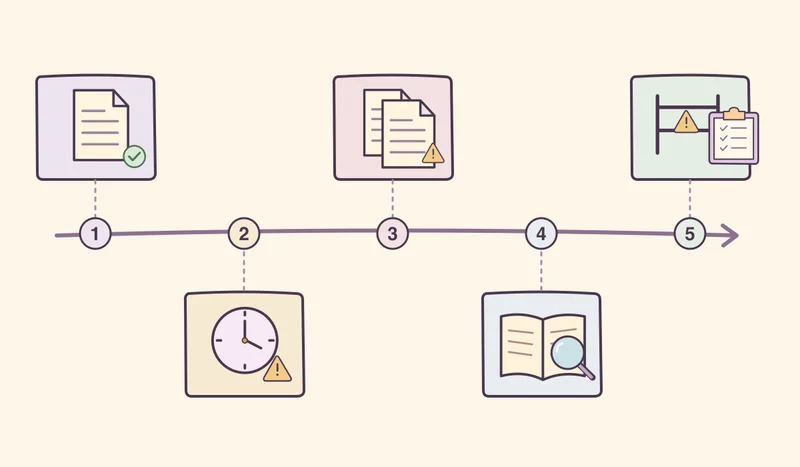
The screen showed a timeout without indicating whether the write succeeded. The connector could resend the request without a control against duplicate creation, and monitoring tracked only failed connector jobs. Finance discovered the issue during reconciliation. The corrective actions should address prevention, the information operators need, and detection. Google SRE Workbook on postmortem analysis and actions
Define the evidence required to close each action
- Integration lead, within five business days. Use a stable source reference and a control that prevents duplicates. Test a successful ERP write with a lost response, then resend the same request. Verify that exactly one invoice exists.
- Operations UI owner, within seven business days. Show an “outcome unknown” status and the reference needed to check the ERP. Run a simulation with someone on call and verify that they can identify what to check before retrying.
- Monitoring owner, within ten business days. Add a check for duplicate references. Use test data to verify that the alert reaches the responsible person with enough information to trace the record.
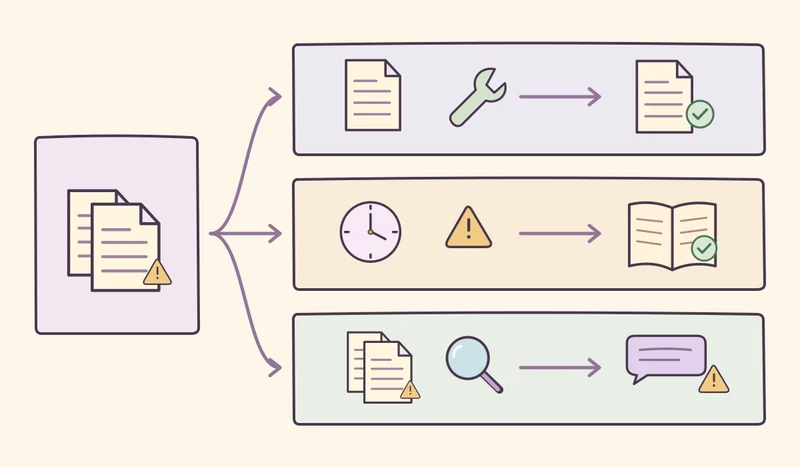
Copyable postmortem template
Incident / date / time zone / coordinator
Impact on users and data / what remains unconfirmed
Timeline (time | event | evidence or source)
What operators could see when they made decisions
Contributing conditions / what limited the impact
Actions (change | owner | due date | verification)
Restricted evidence links / follow-up date
Before sharing, replace client names and document numbers with references as needed. Keep raw logs and accounting details in restricted storage. The broader team needs the details that help it learn. Use the project’s designated channel and owner for client communications.
After a month, check how many incidents qualified and how many were reviewed, how many actions were due and how many have verification evidence, and whether the same workflow had a repeat incident. If closure rates look good and duplicate invoices still appear, check whether the tests cover a successful write followed by a missing response. Google SRE Workbook on following through on actions